
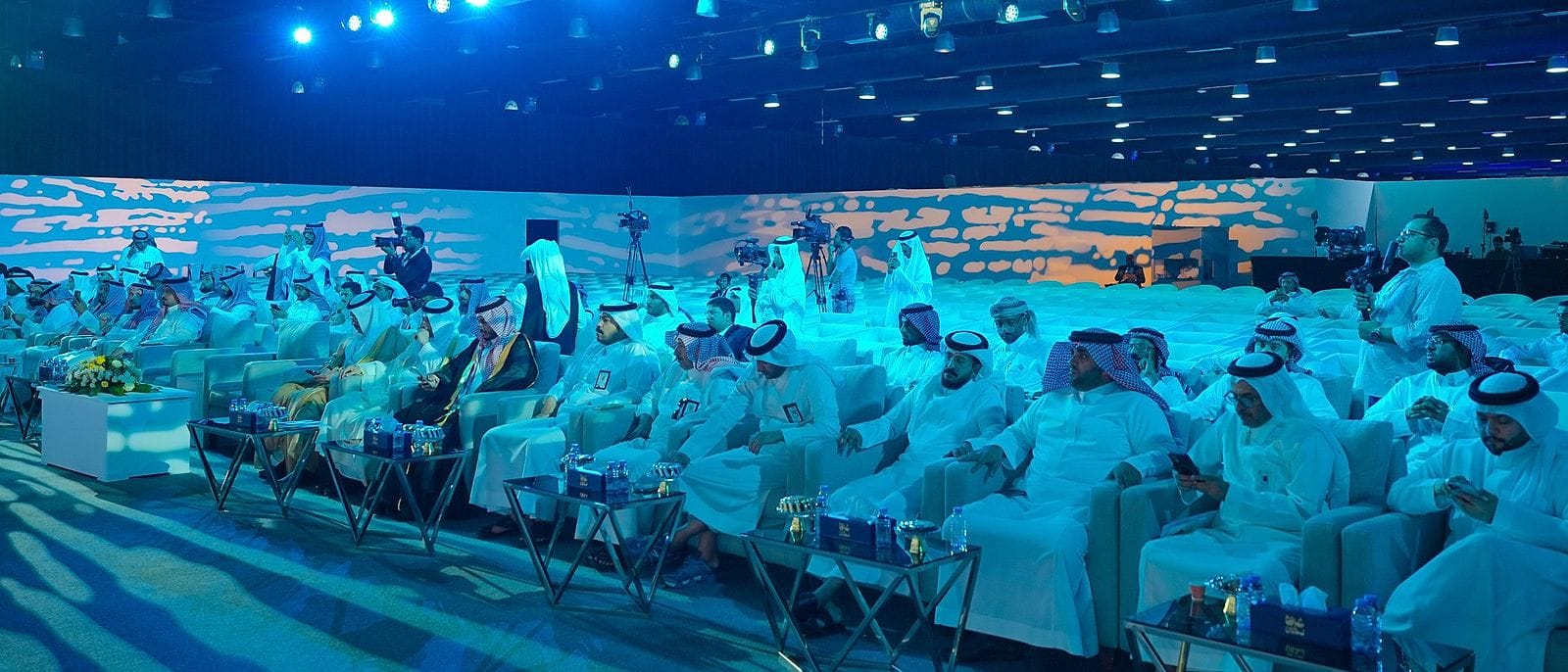
Most of the technical mistakes an audience notices at a conference come from decisions made weeks before the event: a screen too small for the back row to read, a microphone that whistles because sound was never tested with the hall full, and a speaker who looks dark in photos because front light was missing. This is a plain guide to avoiding them, drawn from forums whose technical side we run ourselves.
Why are technical mistakes noticed more than others?
The technical side is the first thing an audience notices when it goes wrong, and the last thing anyone thanks you for when it goes right. A guest who cannot read the speaker's name on screen, or cannot hear the question in a panel session, leaves with the impression that the whole event was disorganised, even if everything else was precise.
Technical errors also multiply in photos and video: a dead screen behind the speaker, or a dark face on stage, stays in the material the entity publishes afterwards. That is why we treat screens, sound and lighting as one system designed with the stage from the start, not as items added in the final week.
How is screen size worked out from the back row?
The first rule is that screen size is worked out from the last row, not from the front row or the VIP seats. If someone at the back cannot read the speaker's name and the session title, the screen is too small, however big it looks from the front. The screen size and viewing distance calculator helps you estimate the right size from the hall's dimensions before you ask for a technical proposal.
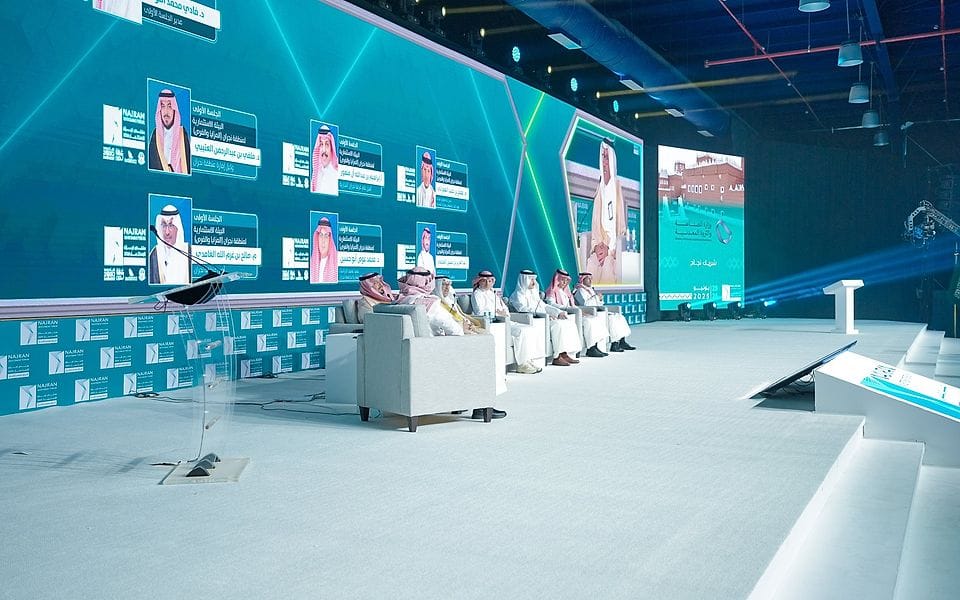
The second rule is that the screen's shape follows the hall's shape. A wide-format screen suits a broad hall better than one large square screen in the middle, because it reaches the side seats and has room for the speaker's name, the event logo and a live feed at once. That is what we delivered at the Najran Investment Forum 2025, with a stage and wide-format screens under a full lighting ceiling.
LED wall or projector?
In lit halls and large conference rooms an LED wall usually wins, because it stays sharp under stage lighting and camera lights. A projector can be enough for darkened meeting rooms and small sessions. LED wall or projector sets out the trade-off in detail.
When you choose an LED wall you will meet the term pixel pitch, the distance between the light points on the screen. The closer the audience sits, the finer the pitch it needs, so that people do not see separate dots. The LED screen and pixel pitch glossary entry explains it in plain language.
Which mistakes are common, and how are they avoided?
| Mistake | Cause | Prevention |
|---|---|---|
| Screen unreadable from the back | Size judged from the front row | Size the screen from the last row before booking |
| Microphone feedback | Rehearsal in an empty hall, levels not set | A full rehearsal and a sound engineer for the whole programme |
| Broken Arabic fonts in presentations | Files opened for the first time on another machine | Collect and check files a day ahead |
| Dark speaker in photos | Backlight with no front light | Front light for the podium and the honours spot |
| Speaker's name appears late on screen | No written technical script | A minute-level script and a single show caller |
How is screen content prepared?
Content follows the event's identity: a fixed logo, session backgrounds, and the speaker's name and title appearing as they step up, not two minutes later. Content is designed at the screen's actual proportions, because a wide-format screen cannot take an ordinary slide deck without distortion or empty bands on either side.
Collect the speakers' presentation files and check them a day ahead on the playback machine itself. Arabic fonts often break when a file is opened on a machine other than the one it was made on, and embedded videos may not play. Each speaker gets a backup copy ready in the control room.
How do you make sure the sound works?
- A full sound check in the hall, ideally close to the event, because an audience absorbs sound and changes its balance.
- Backup microphones on the podium and in panel sessions, ready and charged.
- A sound engineer in the control room for the whole programme, not just the opening.
- A handheld microphone for audience questions, with a host who gets it to the questioner quickly.
What does simultaneous interpretation need?
At international conferences and bilateral forums, simultaneous interpretation needs booths for the interpreters with a clear view of the stage, headsets for the audience tested before the opening, one channel per language, and someone responsible for handing out and collecting headsets. Interpreters need the working papers and speeches before the event so they can prepare the terminology. The simultaneous interpretation glossary entry explains the set-up step by step.
How is the stage lit for photography?
The speaker's face is lit from the front, because backlight and coloured light alone turn them into a silhouette in photos and on the stream. A full lighting ceiling turns an ordinary hall into a complete scene, as in the main hall of the Najran forum 2025, but it does not replace front light on the speakers.
The signing stage and the honours spot get their own lighting, because they are the two moments of the event most likely to be photographed and published. We test lighting through the camera, not by eye, because what looks enough in the room can come out dark in the picture.
How is a live stream prepared?
A live stream needs a plan separate from the hall screen, because what a remote viewer sees differs from what someone in the room sees. It needs cameras at angles fixed in advance, a direct audio feed from the control room rather than a camera microphone, and a dedicated, tested internet connection that is not shared with the audience. If there is simultaneous interpretation, agree in advance whether the interpreter's audio goes out on a separate channel. We test the full stream at rehearsal, from the camera to the platform it plays on, at least a day before the event.
Who runs the show from the control room?
One show caller talks to the stage and to the sound and lighting engineers on a headset, working from a minute-level technical script: who plays the video, when the screen changes, when sound goes up or down, and when the honours spot is lit. The script is built on the conference run of show itself, and you can start from the minute-by-minute conference run-of-show template.
When does the technical rehearsal happen?
After installation is complete, not before, and with the master of ceremonies and as many speakers as possible. The rehearsal runs through every segment in order: the opening and video, the speeches, the sessions, the honours and any signing. Problems that come up are fixed the same night, not on the morning of the event.
What is the technical checklist before the conference?
- Screen size worked out from the last row, with content designed at its real proportions.
- Speakers' files collected and checked a day ahead, with backup copies.
- A full sound check and backup microphones ready.
- Interpretation booths and headsets tested if there is a second language.
- Front light on the podium and separate light for honours and signing, tested through the camera.
- A minute-level technical script and a single show caller.
Running the conference yourselves and only need the technical side? We offer it as a standalone service with our own technical team. Book a free consultation and we will review the hall plan and screen with you.


 Scan to chat on WhatsApp